Designing a home office is one of the best ways to improve productivity, comfort, and work-life balance. A well-planned workspace helps you stay focused, organized, and motivated throughout the day. Whether you work remotely full-time or occasionally, creating the right office setup can make a significant difference in your efficiency and overall work experience.
What Is the Best Home Office Layout for Your Work Style?
The best home office layout depends on two things: the size of your room and the nature of your work. A solo writer needs something very different from a designer who runs client calls all day. Start by mapping your workflow then choose your layout accordingly.
Here’s a quick comparison to guide your decision:
| Layout Type | Best For | Space Needed | Pros | Cons |
| L-Shaped Desk | Multi-taskers, creatives | Medium–Large | Dual work zones, corner-efficient | Takes up more floor space |
| Straight/Linear Desk | Minimalists, writers | Small–Medium | Space-saving, clean look | Limited surface area |
| U-Shaped Desk | Power users, heavy equipment | Large | Maximum surface area | Can feel overwhelming |
| Floating Wall Desk | Cloffice, tight spaces | Very Small | Zero footprint, folds away | No under-desk storage |
| Mirrored Dual Setup | Home office for two | Large | Symmetrical, fair space sharing | Requires noise management |
The L-Shaped Desk Home Office Setup
L-shaped desks are one of the most popular home office layout choices for good reason they make smart use of corners while giving you two distinct work zones. Use one side for your monitor and keyboard, and the other for paperwork, a second laptop, or creative materials.
Standard L-shaped desks typically measure 29–30 inches in depth on each wing, so you’ll want at least a 10×10-foot room to avoid feeling cramped. Pair it with a monitor arm to free up surface space, and run your cables along the desk’s edge for clean cable management.
Designing a Home Office for Two
Sharing a home office is tricky but it works when you plan for it. A mirrored desk layout (two desks facing opposite walls) gives each person their own zone without requiring twice the room.
Invest in shared storage down the center of the room (a low bookcase works well), and use noise-zoning strategies like soft rugs, acoustic panels, or simple noise-canceling headphones. For video calls, stagger your schedules if you can or set up a visual “on air” signal.
The Cloffice: Small Home Office Ideas for Tight Spaces
No spare bedroom? No problem. A cloffice converting a closet into a compact home office is one of the cleverest small home office ideas out there. Remove the hanging rod, install a floating shelf at desk height, add a wall-mounted power strip, and you have a functional workspace you can close the doors on at 5 p.m.
Key essentials for a great cloffice:
- Floating desk shelf at standard desk height (28–30 inches)
- Pegboard or wall organizer above the desk for tools and accessories
- LED strip lighting inside the closet for adequate task lighting
- Small monitor arm to maximize the shallow surface area
- Slim drawer unit from IKEA that fits beneath the shelf
Read More: Wutawhelp Guides for Homes Smart Home Tips Today
How Do I Set Up an Ergonomic Home Office
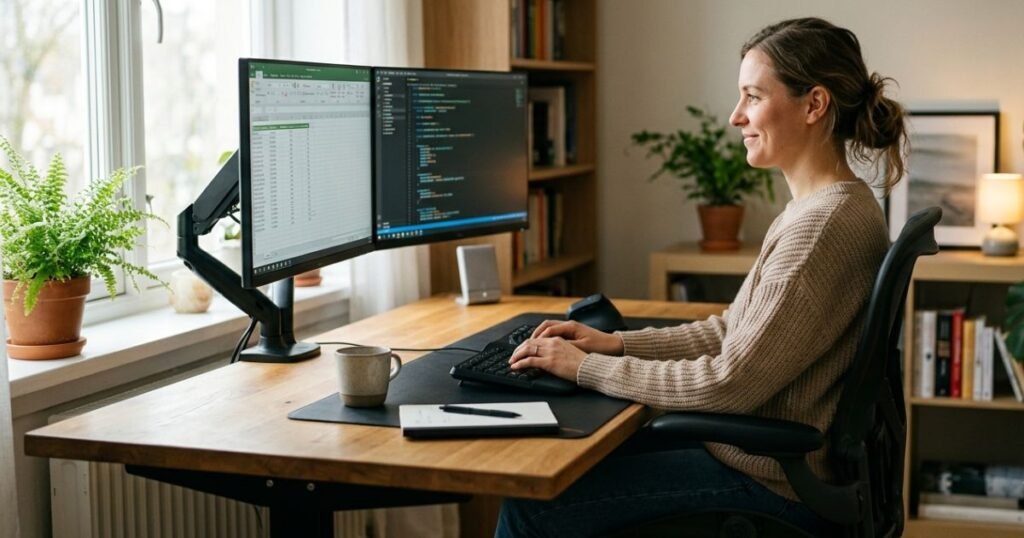
An ergonomic home office setup is one where your body stays in a neutral, strain-free position throughout the workday. That means your monitor is at eye level, your elbows are at roughly 90 degrees, your feet are flat on the floor, and your lower back is properly supported.
Getting this right isn’t just about comfort, it’s about sustained output. Poor ergonomics leads to fatigue, pain, and distraction; good ergonomics lets you work longer and sharper.
Ergonomics checklist for your home office:
- Monitor top is at or just below eye level
- Screen is 20–30 inches from your eyes
- Elbows at 90–110° when typing
- Feet flat on floor (or on a footrest)
- Lower back supported by lumbar cushion or chair adjustment
- Wrists are neutral (not bent up or down)
- Chair height allows thighs to be parallel to the floor
- No screen glare from windows or overhead lights
The Standing Desk Home Office Setup
Sit-stand desks have moved from office novelty to mainstream essential and for good reason. A published study in the Journal of Physical Activity and Health (referencing work tracked via the Call Center Productivity research, Taylor & Francis, 2016) found that employees who used standing desks reported measurably higher output over a six-month period than seated counterparts.
The key is alternating, not standing all day. A common recommendation is the 20-8-2 rule: 20 minutes sitting, 8 minutes standing, 2 minutes moving. Set a timer if you have to.
Look for a desk with programmable height presets so switching between positions takes one button press instead of manual adjustment.
Home Office Setup for Dual Monitors
A dual-monitor home office setup can significantly reduce the time you spend switching between applications, especially valuable for designers, analysts, developers, and writers who reference documents while working.
Position your primary monitor directly in front of you at eye level. Place the secondary monitor at a slight angle (15–30 degrees) to your dominant side to minimize neck rotation. A dual-monitor arm is worth every dollar here: it clears your desk surface, allows infinite repositioning, and keeps cable management clean.
Run cables through a cable spine or adhesive cable clips along the back edge of your desk. It takes 20 minutes and transforms the look and feel of your entire setup.
Choosing the Best Ergonomic Chair for Lumbar Support
Your chair is the single most impactful piece of furniture in your home office. A well-designed ergonomic chair with lumbar support keeps your spine in its natural S-curve, reducing fatigue and preventing the lower back pain that plagues so many remote workers.
When shopping, look for:
- Adjustable lumbar support (height and depth)
- Seat depth adjustment to prevent the edge from pressing into your thighs.
- Adjustable armrests (height and width)
- Breathable mesh back for long sessions
- Seat height range of at least 17–21 inches
Premium options like the Herman Miller Aeron or Steelcase Leap are worth it if you sit eight-plus hours a day.
Read More: WutawHelp Home Guides: Easy Tips for Smart Living
Designing for Focus: Lighting, Color & Feng Shui
Your physical environment directly affects your ability to concentrate. Color influences mood, lighting affects alertness, and the position of your desk shapes how safe and in control you feel at work. These aren’t soft design preferences, they’re cognitive science.
What Are the Best Colors for a Home Office?
Color is one of the most underrated tools in home office design. Here’s a quick reference:
| Color | Mood/Effect | Best For |
| Blue | Calm, focused, trustworthy | Deep work, writing, analysis |
| Green | Balanced, refreshing, low eye strain | Long screen sessions, creative work |
| White/Off-White | Clean, expansive, neutral | Minimalists, small spaces |
| Yellow | Energetic, optimistic, stimulating | Creative work, idea generation |
| Gray | Professional, subdued | Corporate roles, video backgrounds |
| Warm Beige | Comfortable, grounded | Freelancers, home-heavy aesthetics |
Avoid red and orange as dominant wall colors both increase heart rate and can create a sense of urgency that becomes stressful over long periods. If you love warm tones, use them as accents.
Natural Light vs. Artificial Task Lighting
Natural light is your best productivity tool, and it’s free. Studies have consistently shown that access to daylight in the workspace improves alertness and mood. A survey cited by Sketch Studios found that workers reported being 19% more productive in a better-lit working environment.
Position your desk perpendicular to your window rather than directly facing or backing it. Facing a window creates glare on your screen; backing it creates a silhouette effect on video calls.
When natural light isn’t enough or when you work evenings layer your lighting in three ways:
- Ambient lighting: Overhead or ceiling fixtures for general illumination
- Task lighting: A dedicated desk lamp aimed at your work surface (look for a color temperature of 4000–5000K for daytime work)
- Accent lighting: Bias lighting behind your monitor to reduce eye strain during long screen sessions
Biophilic design elements, plants, natural materials, views of greenery also improve focus and reduce stress, even in small doses. A single photo on your desk counts.
Home Office Desk Placement Feng Shui Rules: Step-by-Step
Feng shui desk placement isn’t mysticism, it’s spatial psychology. The core principle, the “command position,” states that you should always be able to see the room’s entrance from your seat without being directly in line with the door. It creates a subconscious sense of safety that reduces low-level anxiety and helps you focus.
Follow these steps to find the optimal desk position:
- Identify your room’s entrance note the main door (or opening, if it’s a cloffice).
- Position your desk diagonally opposite the door, so you face it without sitting directly in its path.
- Ensure a solid wall behind you this symbolizes support and stability in feng shui and also enhances your video call backgrounds.
- Avoid placing your back to a window; it creates distracting glare and a sense of exposure.
- Keep the area in front of you open, don’t face a wall if you can help it; an open view reduces mental claustrophobia.
- Clear clutter from your desk surface feng shui and cognitive science both agree: visual clutter increases mental load.
Read More: How to Get Free Minutes on HomeWAV (A Truth)
Expert Insight: A Real Home Office Transformation
Here’s a real-world example of what intentional home office design can do.
Before: Sarah K., a freelance UX designer in Austin, Texas, was working from a folding table in her bedroom corner. Her setup included a single laptop on a $30 plastic chair, poor overhead lighting, and no storage. She described her workday as “distracted by noon, in pain by 3 p.m.”
After: Over six weeks, Sarah made a series of targeted upgrades total spend:.
- She replaced the folding table with an IKEA BEKANT sit-stand desk
- Added a Branch Ergonomic Chair with lumbar support
- Installed a dual-arm monitor mount and a 27-inch secondary display
- Moved her desk perpendicular to her bedroom window for natural light
The outcome: Sarah reported finishing her billable hours by 4 p.m., rather than 6:30 p.m. the equivalent of recovering 2.5 hours of productive time per day. Her lower back pain resolved within two weeks. She also noted that the visual upgrade made her feel more professional during client calls, which she credits with helping her raise her rates by 20% three months later.
Her transformation mirrors what the research suggests. According to a survey referenced by Sketch Studios, workers report being 19% more productive in a well-designed environment. Small investments in the right places compound quickly.
Conclusion
A thoughtfully designed home office can transform the way you work and increase daily productivity. Focus on choosing the right location, ergonomic furniture, proper lighting, and effective organization. Personal touches can make the space more inspiring while maintaining professionalism. Investing in a functional workspace not only boosts performance but also supports better health and comfort. Start with small improvements and gradually create an office that helps you achieve your goals. The right home office setup can lead to long-term success and a more enjoyable work environment.
FAQs
How do I make a small room into a home office?
Start by choosing furniture that matches the room’s scale and avoid oversized desks in small spaces. A floating wall desk, a cloffice setup, or a compact L-shaped desk in a corner are all excellent small home office ideas. Use vertical storage (shelves, pegboards) to keep the floor clear, and choose light colors to make the space feel larger.
What furniture do I need for a home office?
The non-negotiables are a desk at the right height (28–30 inches for most adults), an ergonomic chair with lumbar support, and adequate lighting. Beyond that, a monitor arm, cable management accessories, and storage (shelves, drawers, or a filing cabinet) make a significant difference in day-to-day usability. Prioritize ergonomics before aesthetics.
Why is home office design important for productivity?
Your physical environment directly affects your cognitive performance. Poor lighting increases eye strain and fatigue; an uncomfortable chair leads to pain that breaks your focus; clutter increases mental load. Well-designed home offices eliminate these friction points, making it easier to enter a focused state and sustain it. Research suggests workers can be up to 19% more productive in optimized workspaces.
Built-in desk vs. freestanding desk: which is better?
Freestanding desks are more flexible; you can rearrange your layout, take them when you move, and swap them out as your needs change. Built-in desks maximize space efficiency and look more polished, making them ideal if you’re permanently converting a spare bedroom. For most remote workers, a quality freestanding sit-stand desk offers the best balance of flexibility, ergonomics, and value.
