A point-of-sale (POS) terminal is a combination of hardware and software that businesses use to process payments, track inventory, manage staff, and generate real-time sales reports. It’s no longer just a payment device—it’s become the operational heart of modern retail, restaurants, and service businesses. Whether you’re running a single boutique shop or managing a multi-location franchise, your POS terminal directly impacts your efficiency, customer satisfaction, and profitability.
What You Need to Know
- POS terminals process payments via cards (chip, magstripe, contactless), digital wallets (Apple Pay, Google Pay), and emerging methods like QR codes
- They do five key things: accept payments, track inventory, manage employees, report sales analytics, and integrate with accounting and loyalty tools
- Types range from fixed countertop terminals to mobile devices to cloud-based systems—choice depends on your business model, budget, and location needs
- Costs vary widely: hardware ($50–$1,500), processing fees (2.1–3.5% per transaction), and monthly software ($0–$300+)
- 2026 trends: contactless adoption (90%+), AI-powered fraud detection, omnichannel integration, and biometric security
What Is a POS Terminal? A Clear Definition
Think of your POS terminal as a mini-computer designed specifically for sales transactions. It consists of two parts working together: the hardware (touchscreen, card reader, receipt printer) and the software (the operating system and apps that run it).
Unlike an old cash register, which only recorded sales, a modern POS terminal connects to your bank, payment processor, and your business systems. When a customer buys something, the terminal:
- Records the sale
- Processes the payment (checking with the bank in seconds)
- Updates your inventory
- Logs the transaction for taxes and reporting
- Sends a receipt to the printer or customer’s phone
This happens in under 30 seconds—and all that data flows into your analytics dashboard so you can see real-time sales trends, staff performance, and customer behavior.
POS vs. old cash registers: A cash register just holds money and prints a receipt. A POS terminal is a connected business hub. It’s the difference between a filing cabinet and a cloud database.
How POS Terminals Work Step-by-Step
Understanding the mechanics builds confidence in your system’s security and capabilities.
Step 1: Transaction Initiation
The customer selects items and approaches the counter (or a staff member rings up their purchase on a tablet). The cashier inputs the total amount—either by scanning items with a barcode reader or manually entering the price.
Step 2: Data Input
The terminal captures the transaction details: items purchased, quantity, price, tax, any discounts, and staff ID. This data is stored locally on the device and synced to the cloud (if using a cloud-based system).
Step 3: Payment Processing
The customer inserts, swaps, taps, or waves their card (or phone) at the card reader. For chip cards, the data is read securely. For contactless (NFC) payments, the device communicates wirelessly. For digital wallets, the terminal sends an encrypted token (not the actual card number).
Step 4: Authorization
The terminal connects to the payment processor and bank in real time. The bank verifies the card has sufficient funds and isn’t flagged as stolen or compromised. This takes 1–3 seconds. If approved, the bank sends back an authorization code.
Step 5: Receipt & Settlement
A receipt prints or is emailed to the customer. The transaction is stored as “settled” and batched with other transactions for daily deposit into your merchant account. Most funds appear in your bank account within 1–2 business days.
Security layer throughout: Your customer’s full card number is never stored on your terminal. Instead, the payment processor uses encryption and tokenization—converting sensitive data into safe codes that hackers can’t read.
Types of POS Terminals: Finding Your Fit
Not every business needs the same terminal. Here’s how to think about the main categories:
Countertop / Fixed Terminals
What they are: All-in-one devices that sit at your checkout counter. They include a display, built-in card reader, receipt printer, and processing power in one unit.
Best for: Retail stores, quick-service restaurants (QSR), salons, and any business with a permanent checkout location.
Key features: Large touchscreen (7–10 inches), fast processing, built-in printer, barcode scanner, ability to handle high transaction volume.
Examples: Verifone Mx series, Ingenico iWL, Square Register, PAX A920.
Cost: $300–$800 upfront; $20–$100/month in software fees.
Pros: Reliable, fast, built-in everything, strong brand recognition.
Cons: Not portable, requires counter space, setup can be technical.
Mobile / Wireless Terminals
What they are: Portable, battery-powered devices that connect via WiFi or cellular (4G/5G). They fit in your hand and move with you.
Best for: Food trucks, pop-up shops, markets, table service (restaurants), outdoor events, any business on the move.
Key features: Compact touchscreen (4–5 inches), built-in receipt printer, fast wireless connectivity, rechargeable battery (8–12 hour life), waterproof options.
Examples: Square Terminal, Clover Flex, PAX A35, Toast Go.
Cost: $200–$500 upfront; $30–$100/month software.
Pros: True portability, smaller footprint, can work offline (limited), growing feature parity with countertop.
Cons: Smaller screen (harder for complex transactions), battery dependency, slightly slower processing on older networks.
PIN Pads / Card Readers (Tablet-Based POS)
What they are: Lightweight card readers that pair with your smartphone or tablet. The tablet runs the POS software; the reader handles just payment.
Best for: Startups, very small businesses, mobile sales, low-volume operations, businesses already invested in iPad/Android.
Key features: Tiny wireless reader ($50–$150), full POS app on tablet, works with your existing device, no printer required (email receipts).
Examples: Square Reader, Clover Mini, Stripe Terminal.
Cost: $50–$150 reader + $0–$50/month software (many offer free tier).
Pros: Very affordable entry point, uses devices you already own, highly portable, simple setup.
Cons: Tablet screen smaller than dedicated terminal, not ideal for high-volume retail, separate receipt printer costs extra.
Cloud-Based POS Systems
What they are: Software-only systems where all data lives in the cloud. Hardware is optional (tablet, computer, or lightweight terminal). Multiple staff can access from different devices in real time.
Best for: Multi-location businesses, franchise operators, restaurants, retailers needing real-time central management, businesses expecting rapid growth.
Key features: Remote management of all locations, real-time inventory sync, built-in employee scheduling, unified analytics dashboard, automatic updates.
Examples: Shopify POS, Toast (for restaurants), Square Online + Register, Clover (also cloud-based), Lightspeed.
Cost: $50–$300/month software (hardware separate); scales with features.
Pros: Truly scalable, automatic updates, real-time multi-location visibility, excellent reporting, easy staff training (same system everywhere).
Cons: Requires reliable internet, subscription cost adds up, less flexibility than on-premise systems for highly customized workflows.
Self-Service Kiosks
What they are: Customer-facing ordering and payment terminals. Customers interact directly with the screen to order and pay.
Best for: Quick-service restaurants, fast-casual chains, movie theaters, cinemas, large retail stores with high transaction volume.
Key features: Large touchscreen (24–32 inches), video/photo menus, built-in payment terminal, ability to collect upsells, age/ID verification for restricted items.
Cost: $1,500–$4,000 per unit.
Pros: Reduces line wait, increases average order value (upsells), reduces labor, collects detailed order data.
Cons: High upfront investment, ongoing maintenance/support, some customer resistance.
| Terminal Type | Best For | Setup Time | Upfront Cost | Monthly Fee | Offline Capability |
| Countertop | Fixed retail, restaurants | 1–2 hours | $300–$800 | $20–$100 | Limited |
| Mobile | Food trucks, pop-ups, table service | 15–30 mins | $200–$500 | $30–$100 | Partial |
| PIN Pad + Tablet | Startups, very small business | <5 mins | $50–$150 | $0–$50 | Good |
| Cloud-Based | Multi-location, fast growth | 1 hour | $0–$500 | $50–$300 | No (internet required) |
| Self-Service Kiosk | QSR, high volume | 4–6 hours | $1,500–$4,000 | $50–$200 | No |
What Modern POS Terminals Do
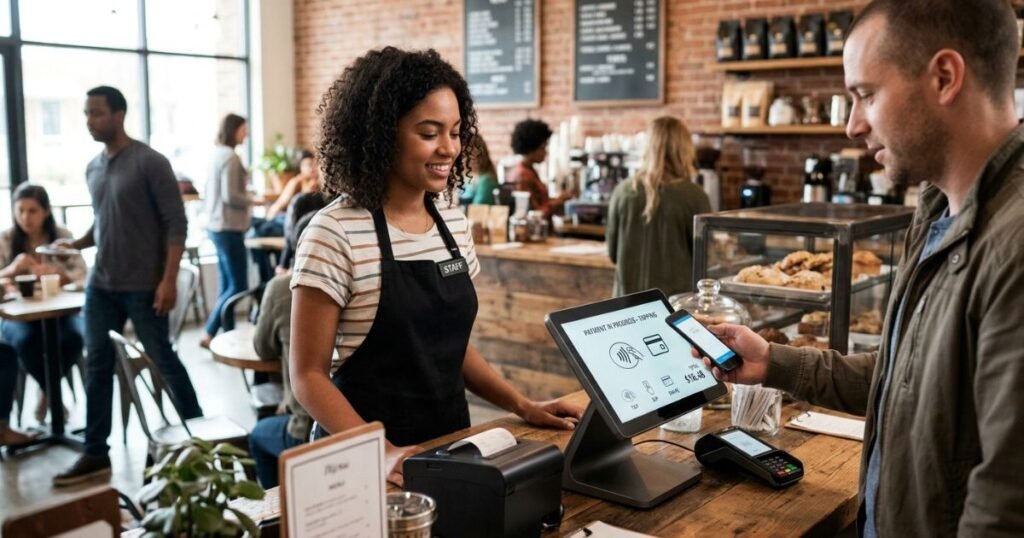
Payment Acceptance
Your terminal should accept at least these:
- Chip cards (EMV): The metallic chip embedded in modern credit/debit cards. This is now the standard for fraud prevention. Your terminal reads the chip securely.
- Contactless/NFC cards and phones: Customers tap or wave their card or phone. 90%+ of new terminals in 2026 support this. It’s fast (1–2 seconds) and hygienic—especially important post-pandemic.
- Digital wallets: Apple Pay, Google Pay, Samsung Pay. These use tokenization (encrypted payment info), making them even more secure than the card itself.
- Magstripe (swiped cards): Still used by ~30% of cardholders, though fraud rates are higher. Newer terminals should phase this out.
Emerging in 2026: QR code payments (small businesses scanning customer codes), BNPL options (Affirm, Klarna integration for split payments).
Inventory Management
Track what you have in real time. When an item sells through the POS, your inventory automatically decreases. Set low-stock alerts so you reorder before running out. For multi-location businesses, see inventory across all stores from one dashboard.
Sales Analytics & Reporting
See which products sell fastest, which hours are busiest, which staff member rings up the most sales. Compare today’s sales to last week, last month, last year. Identify trends: is your profit margin healthy? Are certain categories underperforming?
Employee Management
Staff clock in and out via the POS. Track hours worked, which tasks they performed, and sales attributed to each person. Use clocking codes to categorize work (register duty, stocking, customer service).
Customer Loyalty
Capture customer email or phone number at checkout. Offer points for repeat purchases. Automatically issue promotions based on their buying history. Link to email marketing so you can send targeted campaigns.
Integrations with Your Other Tools
Your POS should plug into your accounting software (QuickBooks, Xero), e-commerce platform (Shopify, WooCommerce), delivery services (DoorDash, Uber Eats), and payroll system (Gusto, Square Payroll). This eliminates manual data entry and reduces errors.
Security & Compliance: Protecting You and Your Customers
PCI-DSS (Payment Card Industry Data Security Standard) is a global set of rules ensuring card data stays safe. Your terminal provider must comply; so do you.
What this means in practice:
- Your terminal encrypts card data so it can’t be intercepted
- Tokenization replaces sensitive info with safe codes
- Your staff shouldn’t see full card numbers
- Your terminal gets automatic security updates
- You maintain a firewall and use strong passwords
Fraud detection in 2026 is getting smarter. AI algorithms now spot patterns: unusual purchase amounts, velocity (too many transactions too fast), or geographic anomalies (a card used in New York one minute and London the next). These flags trigger a decline or require extra verification before the payment goes through.
Bottom line: Modern POS terminals are significantly more secure than older systems. Encrypt, tokenize, monitor—and follow your provider’s security guidelines.
Understanding Costs: Hardware, Processing, Software
Hardware Costs
- PIN Pad + card reader (tablet-based): $50–$150
- Countertop terminal: $300–$800
- Mobile wireless terminal: $200–$500
- Self-serve kiosk: $1,500–$4,000
Many providers now offer equipment financing, spreading the cost over 24–60 months instead of paying upfront.
Processing Fees
This is what you pay per transaction. Rates vary by:
- Card type (debit vs. credit vs. rewards card)
- How the card is used (chip, contactless, keyed in, online)
- Your monthly volume (higher volume = lower rates)
- Your industry (retail is lower risk than high-fraud verticals)
Typical ranges:
- Card-present (in-person): 2.1% + 10¢ to 3.5% + 30¢ per transaction
- Keyed-in (manual entry): 3.5%–4% + per-transaction fee (riskier for the processor)
- Online/e-commerce: 2.7%–3.5% + 30¢
- Digital wallets (Apple Pay, Google Pay): Usually same as chip (2.1%–3%)
Example: A $100 sale with a 2.75% + 15¢ fee costs you $2.90 in processing.
Monthly Software & Service Fees
- POS software: $0–$300/month (many offer free tiers for micro-businesses; larger systems cost $100–$300)
- Payment gateway: Often bundled into processing; sometimes $20–$100 separate
- Customer support tier: Basic (free or included) to premium ($50–$200/month)
- Add-ons (loyalty program, advanced reporting, integrations): $10–$100/month each
Real-World TCO Example
Small retail shop:
- 1 countertop terminal
- ~$40K annual sales
- Processing rate: 2.75% + 15¢ per transaction (~250 transactions/month)
Annual costs:
- Hardware: $400 (amortized over 3 years)
- Processing: ~$1,100 (2.75% of $40K = $1,100 + ~$450 in per-transaction fees)
- Software: $120/year (budget option)
- Total: ~$1,620/year (~4% of revenue)
Restaurant with 4 terminals:
- Multi-location POS system
- ~$500K annual sales
- Processing rate: 2.85% + 15¢ (volume discount)
Annual costs:
- Hardware: $1,000 (amortized)
- Processing: ~$14,750 (2.85% of $500K = $14,250 + ~$900 in per-transaction fees)
- Software: $2,400/year (mid-tier restaurant platform)
- Support/integrations: $600/year
- Total: ~$18,750/year (~3.75% of revenue)
The larger your volume, the better your negotiating power on rates.
How to Choose the Right POS Terminal for Your Business
Start with this 5-question checklist:
1. What’s your business model? (Retail, restaurant, service, hybrid)
Retail needs strong inventory features. Restaurants need table management. Service businesses need appointment integration.
2. How many transactions monthly? (Low <100, Medium 100–1K, High >1K)
Low-volume businesses can use budget PIN pad systems. High-volume operations need robust, proven hardware.
3. Do you have one location or multiple?
Single location? The fixed countertop terminal works fine. Multiple locations? Cloud-based POS is almost mandatory for real-time management.
4. What integrations do you actually need? (Accounting, loyalty, delivery, payroll)
Not every system integrates with every tool. Research before choosing.
5. What’s your realistic budget? (Hardware + monthly combined)
Budget-conscious? PIN pad + free/low-cost POS app. Growing fast? Invest in a cloud-based system for future flexibility.
For Small Retail Shops
You likely want a countertop terminal or PIN pad + tablet. Prioritize inventory tracking and customer insights. Processing fees matter—shop rates aggressively since retail margins are thin. Budget $50–$100/month total.
Recommended platforms: Square, Shopify POS (if already using Shopify), or Clover.
For Restaurants
You need table management, split checks, tip handling, and kitchen display integration. Mobile terminals for table-side payment speed up service. Cloud-based for multi-location visibility.
Recommended platforms: Toast (if you want a best-in-class restaurant-specific system), Clover, Square Online + Register.
For Startups / Pop-Ups
Start lean: PIN pad + your existing smartphone or tablet. No long-term contract. Grow into a bigger system when you have consistent volume.
Recommended platforms: Square, Stripe Terminal, PayPal Here.
2026 Trends: What’s Changing in POS Technology
Contactless Adoption Is Now Standard
Over 90% of terminals shipped in 2026 support NFC. It’s not a “nice-to-have” anymore—customers expect it. If your current terminal doesn’t support contactless, it’s getting old. Plan an upgrade within the next 1–2 years.
AI-Powered Analytics & Fraud Detection
Next-gen systems use machine learning to:
- Predict inventory shortages before they happen
- Identify which customer segments are most profitable
- Spot fraudulent transactions in real time (not after the fact)
- Recommend optimal pricing based on demand
Unified Omnichannel: In-Store + Online + Mobile
Customers expect a seamless experience: buy online, pick up in-store. Order via app, pay in-person. See in-store inventory when shopping online. Leading POS platforms now tie in-store sales, e-commerce, and mobile payments into one system with shared inventory and customer data.
Biometric Payment Authentication
Fingerprint and facial recognition are appearing on terminals in some markets. Adds security without slowing down checkout.
Sustainability Push
Digital receipts by default (not printed). Lower-power devices. Manufacturer recycling programs. Small changes, but growing industry expectations.
Conclusion
A POS terminal isn’t just a payment device anymore—it’s your business’s operational nerve center. It processes payments securely, tracks inventory in real time, gives you sales insights, and integrates with every tool you use to run your business.
Choosing the right one depends on your business model, location setup, budget, and growth plans. Don’t overspend on features you don’t need, but don’t under-invest in security or reliability.
FAQs
Why is a POS terminal important for my business?
Beyond processing payments, a POS terminal gives you real-time visibility into your business. You see sales trends, identify your best customers, optimize inventory, and reduce staff theft through accountability. It’s the data hub that helps you make smarter pricing and inventory decisions.
What’s the difference between a mobile POS and a traditional terminal?
A mobile terminal is portable, battery-powered, and works on WiFi/cellular. A traditional (countertop) terminal stays in one place and is typically wired. Choose mobile if you’re on the move; choose countertop for high-volume fixed retail.
Can I use my iPad as a POS terminal?
Yes. You pair a small card reader to your iPad, install a POS app (Square, Clover, Toast), and you’re set. This is perfect for very small businesses or pop-ups. The downside: tablet screens are smaller, no built-in printer (unless you add one), and durability is lower in a retail setting.
How long does a POS terminal last before I need to replace it?
3–5 years is typical. After that, software may not run smoothly, security updates may stop, and hardware can fail. Plan for a refresh cycle every 5 years or if you need new features.
Do I need the internet for my POS terminal?
Most modern terminals require the internet for real-time payment authorization and inventory sync. Some have offline modes (buffer transactions, sync later), but you lose real-time capabilities. For cloud-based systems, the internet is mandatory.
What happens if my POS terminal breaks during business hours?
Have a backup. Many providers offer hardware replacement within 24 hours. Some businesses keep a cheap PIN pad + tablet as a backup so they can still take payments. Mobile terminals work as backups for fixed systems.
Can I switch to a different POS provider later?
Yes, but it takes work. You’ll need to export your historical data (sales, customers, inventory levels), migrate it to the new system, and retrain staff. Plan for 1–2 weeks of overlap. Avoid long-term contracts if possible; monthly is better for flexibility.
Is my data safe on a cloud-based POS?
Yes, if the provider is PCI-DSS compliant. Cloud providers invest heavily in security, encryption, and backup. They’re actually safer than on-premise systems because updates are automatic and they have teams dedicated to security. Your data is more redundant (backed up in multiple data centers).
What payment methods should I support in 2026?
At minimum: chip cards, contactless cards and phones (Apple Pay, Google Pay), and online payment (if you sell online). Don’t rely solely on cash; most younger customers and a growing % of older ones prefer cards/digital. Plan for 50%+ of transactions to be contactless by 2027.
How do I know if a terminal is secure?
Look for: PCI-DSS certification, end-to-end encryption, tokenization, regular security updates, and reputable provider reputation. Ask your provider about their security audits and breach history. Never use a terminal from an unknown brand with no track record.
