An SPF checker is an online validation tool that examines a domain’s Sender Policy Framework configuration and confirms whether the published SPF record is valid, complete, and aligned with email authentication requirements. In practice, an SPF checker performs an SPF lookup, reads the domain’s DNS records, evaluates the TXT record that contains SPF policy data, and reports whether the SPF syntax follows the SPF Standard defined in RFC 7208.
For administrators, security teams, and email operations specialists, an SPF record checker is more than a simple DNS lookup utility. It is an SPF diagnostic tool that helps prevent email phishing, email impersonation, and unauthorized use of a domain in forged messages.
SPF Checker vs. SPF Lookup vs. SPF Test Tool
Although the terms are often used interchangeably, they describe slightly different functions:
- An SPF lookup retrieves the SPF record from DNS.
- An SPF record lookup shows the TXT record and its SPF mechanisms.
- An SPF checker evaluates whether the record is valid.
- An SPF test tool simulates SPF authentication against a sending source.
- An SPF record checker reviews SPF syntax, SPF tags, lookup depth, and authorization logic.
A strong SPF diagnostic tool combines all of these capabilities. It should show whether an SPF record exists, whether the SPF record status is valid, whether SPF validation produces an SPF pass or SPF fail, and whether the SPF lookup tree creates excessive DNS lookup volume.
Why Mailbox Providers Care About SPF Validation
Mailbox Providers such as Google, Microsoft, Verizon, and other receivers use SPF authentication as one signal in broader email authentication and policy enforcement. SPF helps determine whether a sending mail server is permitted to send email for the domain used in the return path.
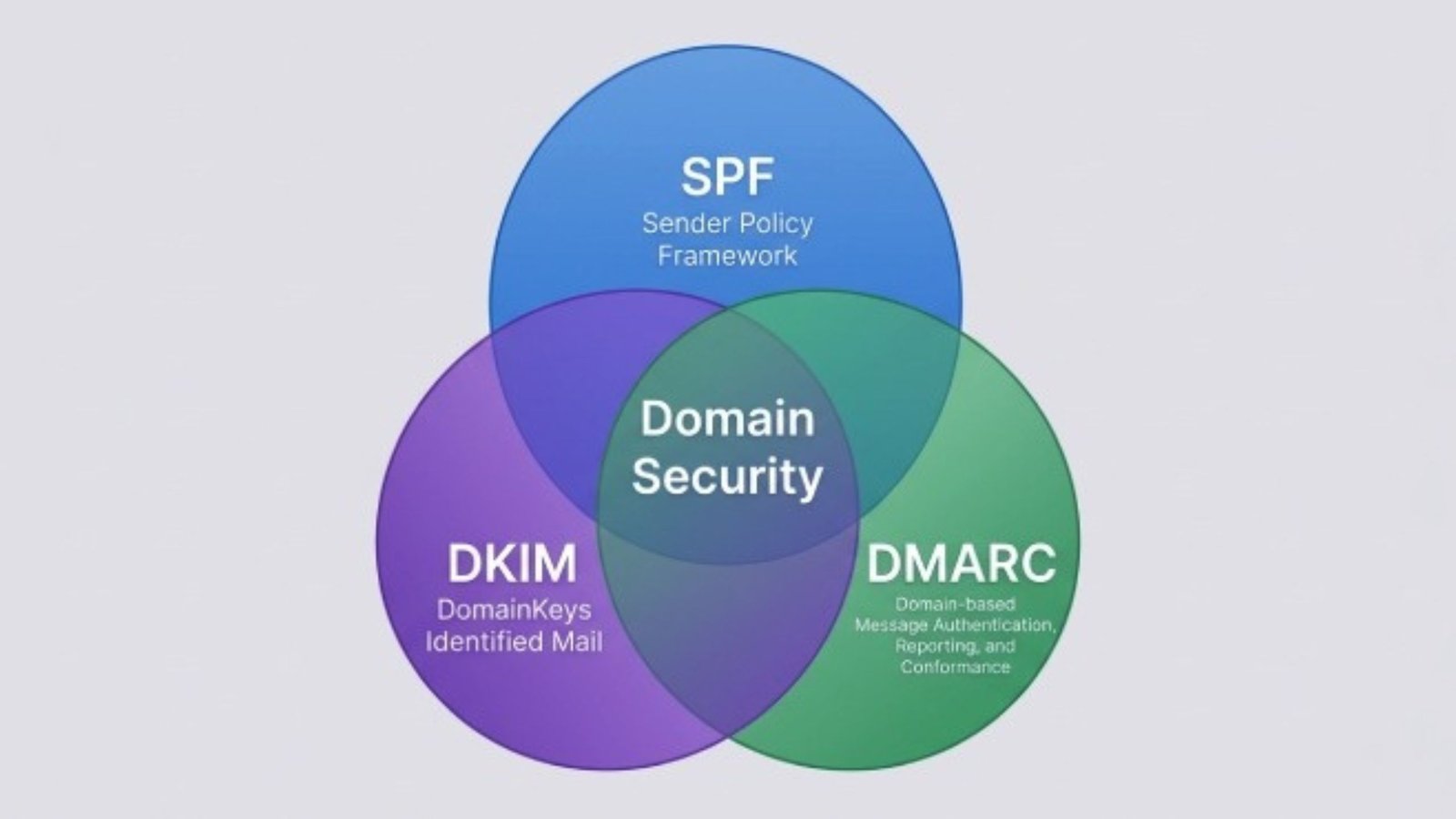
SPF validation also supports DMARC compliance. DMARC uses SPF and DKIM authentication to evaluate domain authentication alignment. A properly maintained SPF record can help a DMARC record and DMARC Policy work as expected, especially when combined with DKIM and consistent domain alignment.
How SPF Records Work in Email Authentication
An SPF record is a DNS TXT record that lists authorized sending sources for a domain. When a receiving server gets a message, it performs an SPF return-path check against the domain in the envelope sender. The receiver then performs a DNS lookup, retrieves the SPF record, interprets the SPF syntax, and checks whether the sending IP address matches an approved SPF mechanism.
Anatomy of an SPF Record
A typical SPF record might look like this:
v=spf1 ip4:192.0.2.10 include:_spf.google.com include:spf.protection.outlook.com -all
This SPF record contains several important SPF tags and mechanisms:
- v=spf1 identifies the TXT record as an SPF record.
- ip4 authorizes an IPv4 sending source.
- include authorizes another domain’s SPF policy.
- -all defines how non-matching senders should be handled.
The SPF record checker evaluates each SPF mechanism, confirms valid SPF syntax, and reports whether the configuration supports IP address authorization for all legitimate systems.
Common SPF Mechanisms
Core SPF mechanism types include:
- spf ip4 for IPv4 addresses.
- spf ip6 for IPv6 addresses.
- spf a record matching for a domain’s A record.
- mx for mail exchangers.
- include for third-party senders.
- redirect for delegating policy evaluation.
The SPF include tag is especially common for cloud platforms.
Understanding the SPF All Tag
The SPF all tag appears at the end of the SPF record and tells receivers how to treat sources that do not match previous SPF mechanisms. Common SPF qualifiers include -all, ~all, ?all, and +all. An SPF checker should flag risky SPF syntax such as +all, because it effectively permits any mail server to send on behalf of the domain.
Common SPF Record Errors an Online Checker Can Detect
An online SPF checker helps detect configuration mistakes before they damage email deliverability or weaken domain security. A reliable SPF record checker should produce a clear SPF report that identifies each SPF error and explains the operational risk.
For comparison and troubleshooting, administrators sometimes use multiple utilities to verify whether different resolvers see the same SPF record status.
Missing, Duplicate, or Malformed SPF Records
One common issue is that no SPF record exists. In that case, the SPF exists check fails, and the domain has no published Sender Policy Framework protection. Another common problem is publishing more than one SPF record as separate TXT records. SPF validation requires only one SPF record per domain; multiple records can cause a permanent SPF error.
Malformed SPF syntax is also frequent. A good SPF diagnostic tool performs a strict SPF record check and explains why the SPF record fails.
DNS Lookup Limit and SPF Lookup Tree Problems
SPF is limited to 10 DNS lookups during evaluation. Excessive include, a, mx, ptr, exists, and redirect mechanisms can exceed that limit and trigger an SPF fail or permerror. An SPF lookup tree helps visualize nested includes and identify where lookup bloat occurs.
Tools such as the PowerDMARC SPF record lookup can help inspect whether an SPF record lookup depends on too many third-party services. This is especially important for companies using Google Workspace, Microsoft 365, CRM platforms, help desks, marketing automation tools, and transactional email services.
Risky Includes and Overly Broad Authorization
A poorly maintained SPF include tag may authorize more senders than intended. Likewise, large IP ranges can weaken spoofing prevention if they authorize infrastructure the organization no longer uses. SPF management should include regular review of authorized sending sources, including SaaS platforms, legacy systems, and internal mail server infrastructure.
Alignment Issues With DMARC and DKIM
SPF authentication alone does not guarantee DMARC compliance. DMARC checks whether SPF or DKIM aligns with the visible From domain. If SPF passes on the return-path domain but does not align with the From domain, the message may still fail the DMARC policy. This is why SPF validation, DKIM authentication, and DMARC record monitoring should be managed together.
Step-by-Step Guide to Using an SPF Checker Online
Using an SPF checker online is straightforward, but interpreting the results requires attention to DNS, SPF syntax, and domain authentication context. Whether you use EasyDMARC SPF Checker, an SPF Record Lookup Tool, a command-line method such as NSLOOKUP or DIG, or another SPF test tool, the objective is the same: confirm that the SPF record accurately represents your authorized sending sources.
Step 1: Enter the Domain for SPF Lookup
Start by entering the root domain, such as easydmarc.us, into an SPF checker. Do not enter a full email address unless the tool specifically asks for it. The SPF lookup queries DNS for the TXT record containing v=spf1.
An SPF record checker should confirm whether the SPF record exists and display the raw SPF record. If no SPF record exists, the tool should report a failed SPF existence check and recommend publishing a valid TXT record.
Step 2: Review SPF Syntax and SPF Tags
Next, inspect the SPF syntax. The SPF record should begin with v=spf1 and include only valid SPF tags and mechanisms. A strong SPF diagnostic tool will highlight invalid SPF tags, unsupported SPF mechanism values, missing spaces, duplicate mechanisms, and risky qualifiers.
You can compare results with another independent Red Sift SPF checker if you suspect DNS propagation delays or resolver inconsistencies. This helps confirm whether the SPF validation issue is local, global, or tool-specific.
Step 3: Validate Authorized Sending Sources
Review every authorized source in the SPF record. Confirm that each spf ip4, spf ip6, mx, a, include, or spf redirect entry is still required. For example, if your organization uses Google, _spf.google.com may be legitimate.
The SPF test tool should show whether each source can produce SPF pass results. If an unauthorized mail server attempts to send, the SPF record should produce an SPF fail or softfail depending on the SPF qualifiers and SPF all tag.
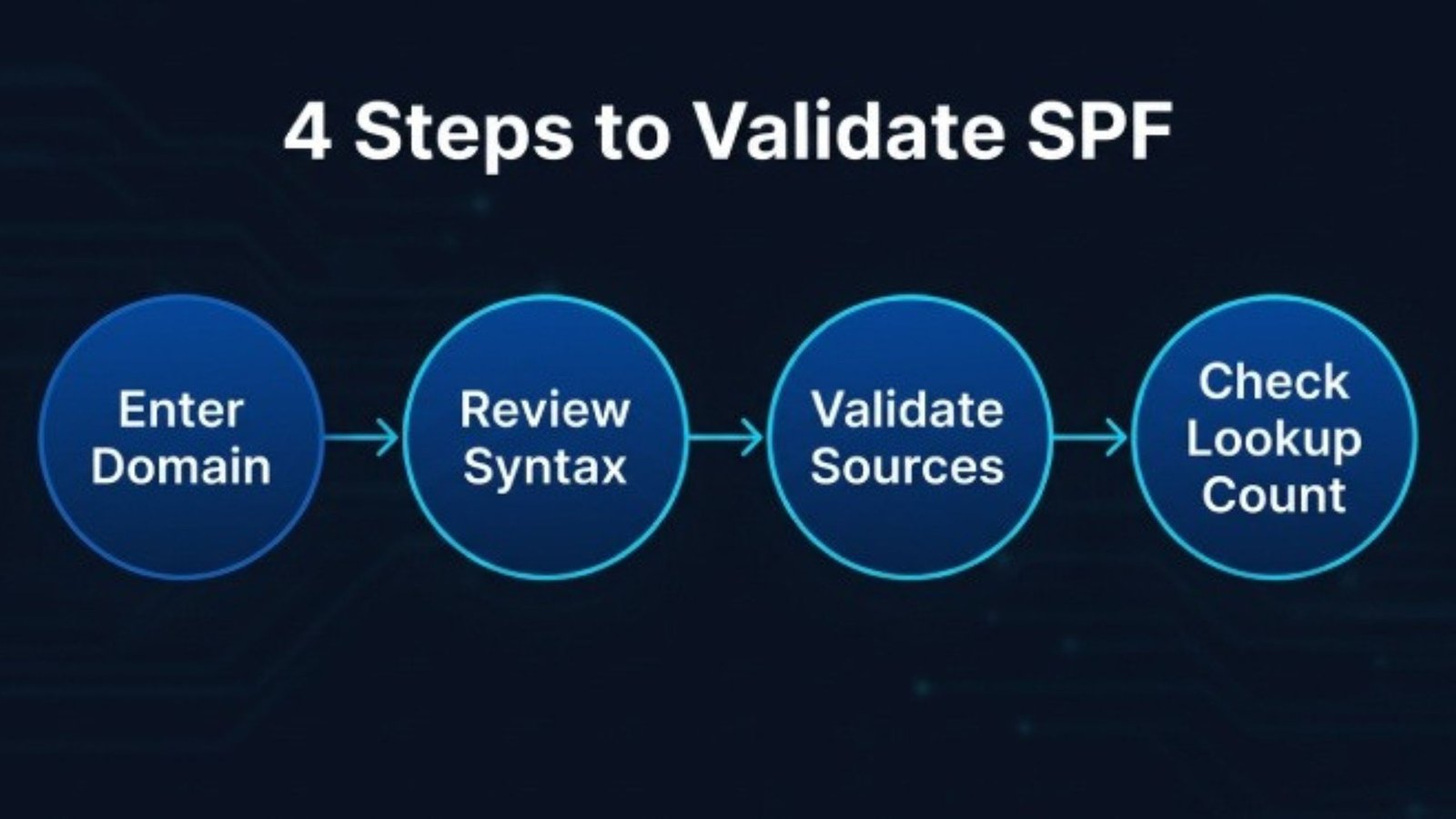
Step 4: Check Lookup Count and Return-Path Behavior
Run an SPF record lookup that shows the SPF lookup tree. This helps identify nested includes and potential 10-lookup-limit failures. Also confirm the SPF return-path check because SPF validates the envelope sender domain, not necessarily the visible From header.
Best Practices for Maintaining a Valid SPF Record
Keep One Clean SPF Record
Maintain exactly one SPF record per domain. It should be a single TXT record, not multiple separate SPF records. Use clear SPF syntax, remove obsolete includes, and document every SPF mechanism. A clean SPF record improves email deliverability and reduces the risk of SPF error conditions.
For hands-on testing, a dedicated SPF record validation tool can help verify DNS visibility across locations and confirm that the latest SPF record lookup returns the expected value.
Monitor SPF Alongside DMARC and DKIM
Use SPF monitoring with DMARC aggregate reporting to see whether legitimate mail sources are passing or failing. DMARC reports can reveal shadow IT, unauthorized platforms, and email impersonation attempts. EasyDMARC Managed SPF services and records can help organizations simplify SPF management when lookup limits become difficult to control.
FAQs
What is Sender Policy Framework (SPF)?
SPF is an email authentication protocol that specifies which mail servers are authorized to send emails on behalf of your domain. It’s published as a DNS TXT record and prevents spammers from impersonating your domain. When receiving mail servers get an email from your domain, they check your SPF record to verify the sender is authorized.
How does an SPF Checker work?
An SPF checker retrieves your SPF record from DNS, validates the syntax, counts DNS lookups, detects errors (duplicates, typos, over-limit issues), and analyzes your policy (soft fail ~all vs hard fail -all). Most tools show exactly which servers are authorized to send on your behalf.
What does ‘Too Many DNS Lookups’ mean?
SPF allows a maximum of 10 DNS lookups. Each include:, mx, or a mechanism counts as one. Exceeding this limit causes a PermerError (permanent failure), and receiving servers ignore your SPF record entirely, failing authentication for all emails.
Fix: Use SPF flattening (replace includes with IP addresses), remove unused services, consolidate vendors, or use subdomains for separate SPF records.
What’s the difference between SPF, DKIM, and DMARC?
• SPF: Verifies the sending server is authorized (checks envelope sender) • DKIM: Uses cryptographic signatures to prove the message wasn’t altered • DMARC: Ties both together, checks alignment with visible “From” address, and enforces policy You need all three for maximum security and deliverability.
What are the most common SPF errors?
• No SPF Record: Publish one immediately • Syntax Error: Typos, missing v=spf1, or formatting issues • Multiple Records: Merge into a single record • Too Many Lookups: Over 10 DNS lookups causes failure • Wrong Policy: Using -all (hard fail) before inventorying all senders
How do I read SPF Checker results?
• SPF Pass: Record is valid and configured correctly • PermerError: Syntax error or >10 lookups—mail servers ignore it entirely. Fix immediately. • TempError: Temporary DNS failure (usually resolves on its own) • None: No SPF record found—publish one now
What’s the difference between ~all and -all?
~all (Soft Fail): Tells servers to accept email even if it fails SPF. Use while inventorying all legitimate senders. -all (Hard Fail): Tells servers to reject email if it fails SPF. Use only after confirming all senders are included.
How long does it take for SPF changes to take effect?
DNS changes propagate globally in 24-48 hours due to caching. Some changes take effect within minutes; others take several hours. Test your SPF record before publishing and wait before sending critical emails after updates.
Do I need SPF if I’m using DKIM and DMARC?
Yes. SPF, DKIM, and DMARC are complementary, not interchangeable. Many mail servers still rely primarily on SPF. Google and Yahoo require all three for bulk senders as of February 2024. DMARC also depends on SPF or DKIM to function.
Does email forwarding break SPF?
Yes. Forwarding servers add their own headers while keeping the original sender’s domain. The forwarder’s IP often isn’t in your SPF record, causing authentication to fail.
Solutions: Use SRS (Sender Rewriting Scheme) on your forwarder, add the forwarder’s IP to your SPF, or rely on DKIM + DMARC alignment for forwarded mail.
Is my SPF record too complex?
If you’re approaching 10 DNS lookups or using nested includes, simplify: audit and remove unused services, consolidate vendors, use SPF flattening (replace includes with IP addresses), or configure separate SPF records for subdomains.
How do I monitor my SPF record?
Check quarterly with an SPF Checker tool, track changes when adding/removing services, monitor DMARC reports for SPF failures, enable DNS change alerts, and test after every update. Maintain a spreadsheet of all authorized senders.
What if my SPF record exceeds DNS character limits?
DNS TXT records have a 255-character-per-string limit. Split across multiple TXT strings (auto-concatenated by most DNS providers) or use the redirect: modifier to point to another domain’s SPF record.
Why are Google and Yahoo requiring SPF?
Since February 2024, Google and Yahoo require bulk email senders to authenticate with SPF, DKIM, and DMARC. Microsoft added similar requirements for Outlook in 2025. Without proper authentication, emails are rejected or marked as spam.
Ready to check your SPF record? Use our free SPF Checker tool—instant validation, zero signup required.
